

A useful filter answers a practical question: may this EA consider a new position with the information currently available? A session label or an empty calendar alone cannot answer it. The rule needs a verified clock, clear event coverage and current quotes for the symbol being traded.
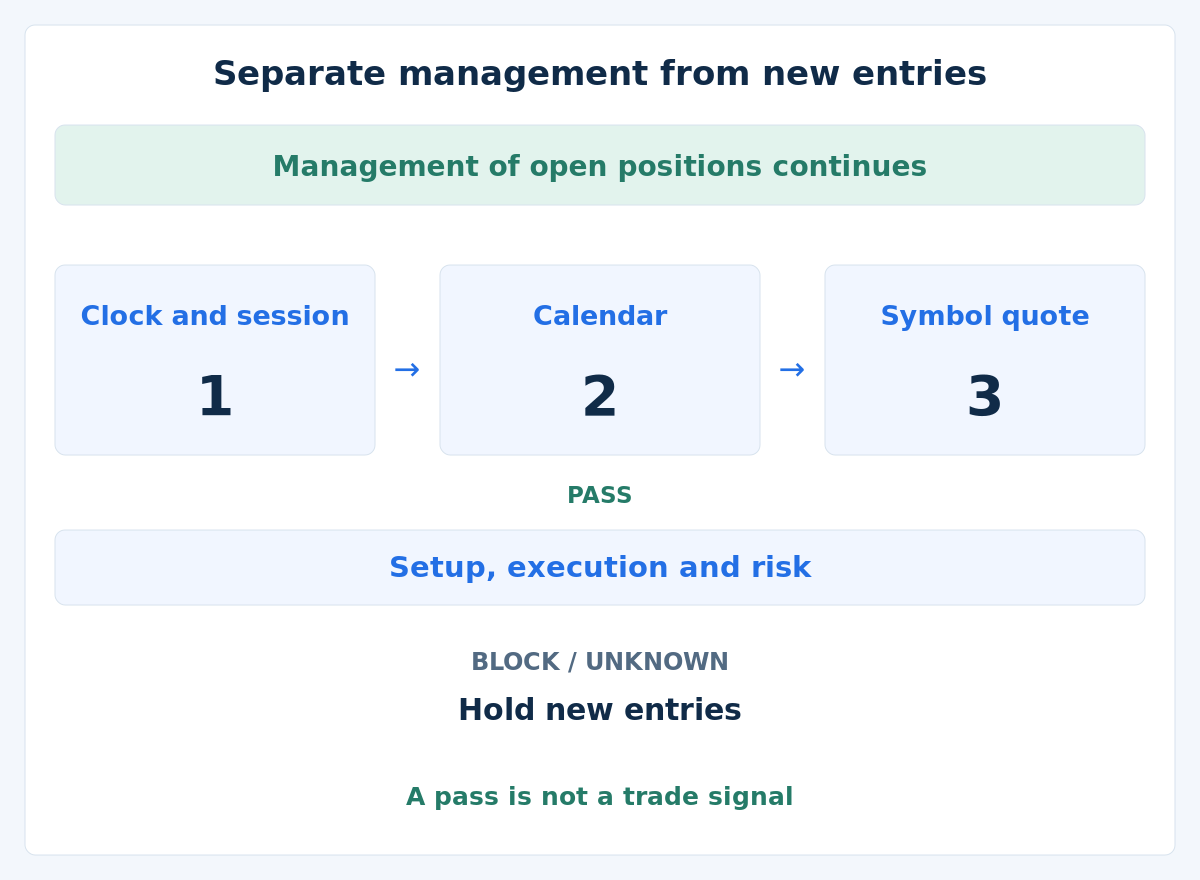
Start with a simple separation: manage existing exposure under its own rules; allow new-entry consideration only after the required checks pass. This guide specifies that separation, illustrates a short decision log and explains how to test it. It does not supply a finished EA or evidence of profitability.
1. Define what the filter controls
Separate a session rule, a scheduled-news restriction and the strategy's entry setup. A session rule describes permitted times; a news rule excludes selected intervals; the setup defines the trading opportunity. Passing the first two does not create a setup or remove execution and account-risk limits.
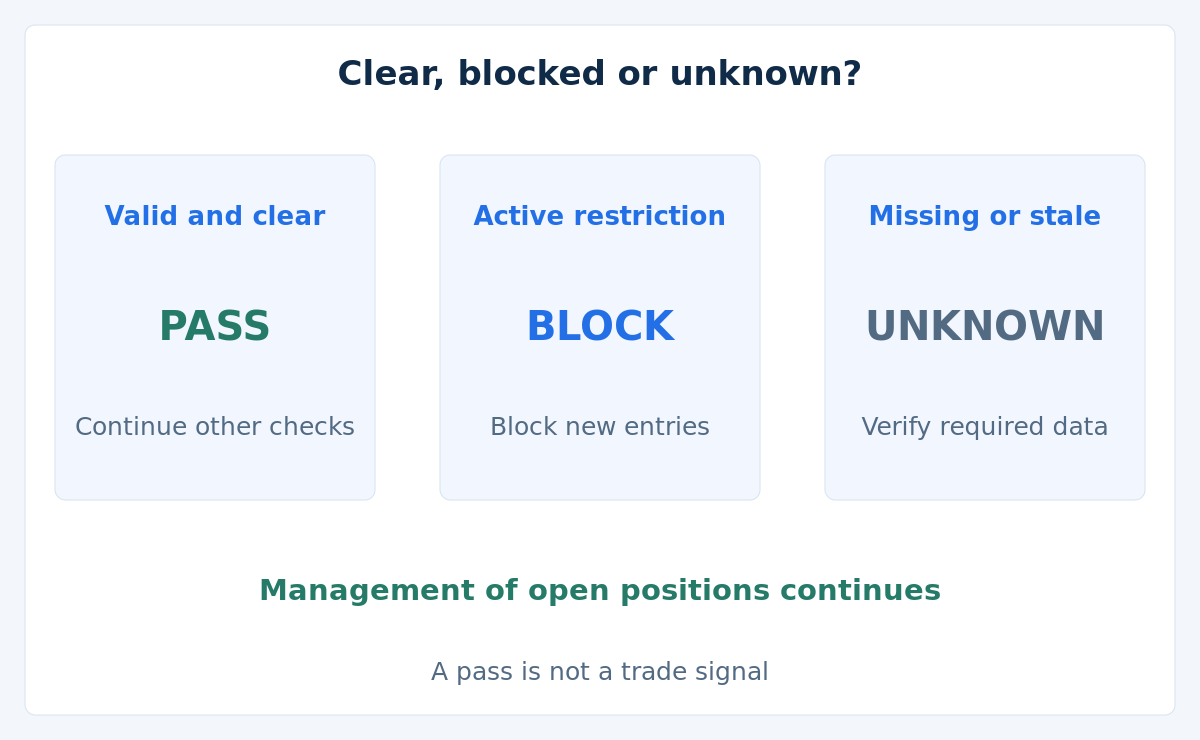
Use three explicit outcomes: PASS, BLOCK and UNKNOWN. These are author-defined data labels, not MT4 error codes. A known closed window can block; missing information cannot justify a pass. For the policy illustrated here, either a block or an unknown required input holds new-entry consideration. Management follows its own data and permission checks.
2. Write the time and coverage rules before testing
Use the dated clock mapping from the session guide and the event definitions from the economic-calendar guide. Record the rules in a versioned specification that another person could apply to the same inputs.
- Instrument and scope: broker, account, symbol, relevant currencies and selected event families, including follow-up stages.
- Session: full dates, time zone, weekday rules and precise inclusive/exclusive boundaries.
- Clock mapping: the verified relationship between UTC, any local rule and dated broker server time.
- News exclusion: event-time source, pre/post intervals, overlaps and handling of tentative, delayed or changed events.
- Data contract: required date/currency coverage, schema, source version, update status and freshness limits.
- Failure response: what holds new entries, how monitoring and position management continue, and what must be reconciled before resuming.
For local sessions crossing midnight, define the trading-day label and handle date changes explicitly. Include events whose exclusion reaches the decision time from an adjacent date. For DST transitions, verify the chosen conversion of repeated or nonexistent local times. Do not silently substitute the computer's display zone when a mapping is missing.
3. Validate the calendar snapshot, not just the download
A snapshot is a saved version of the calendar used for a decision. A successful download or an empty event array does not establish completeness. Check that the provider supports the requested currencies, dates and event types, that all required records were retrieved, and that times, units and versions parsed correctly.
Keep provider update information and your receipt time separately. A newly received reply may contain old data. Replace the active snapshot only after the whole new version passes validation; a partial file or half-updated list must not become valid. A failed refresh or another read of the cache must not reset the age of the last checked version.
A verified, sufficiently current snapshot can establish that no selected interval is active within its declared coverage. Missing coverage, an unresolved schedule change, an unknown relevant event time or an expired snapshot remains unknown. Apply the predetermined hold on dependent new entries and continue the defined fault-handling and management path. Unscheduled news remains outside a scheduled calendar's protection.
4. Check the traded symbol's quote separately
Track receipt and validity of that symbol's Bid/Ask, using an elapsed-time method that handles restarts and clock changes. A recent receipt does not prove that upstream data is current or that a fill is available. Validate the feed and clock context, spread and trade permissions as separate conditions; see EA monitoring.
In MT4, TimeCurrent() in OnTick() refers to the handled tick; in other handlers it can reflect the latest Market Watch quote from any symbol. It is not proof that your own symbol has a recent quote. Live TimeGMT() depends on the computer's time settings; in the MT4 tester it equals simulated TimeCurrent(). Their tester difference cannot reconstruct historical broker offsets.
5. Follow an invented decision log
For this example only, use the UTC session [08:00, 17:00) on 2026-03-16. Keep the hypothetical A/B news union [12:15, 13:05) from the previous guide. All required coverage and metadata are assumed verified; event coverage spans the full UTC day, which is sufficient for these daytime checks and their padding. No actual provider or release is asserted.
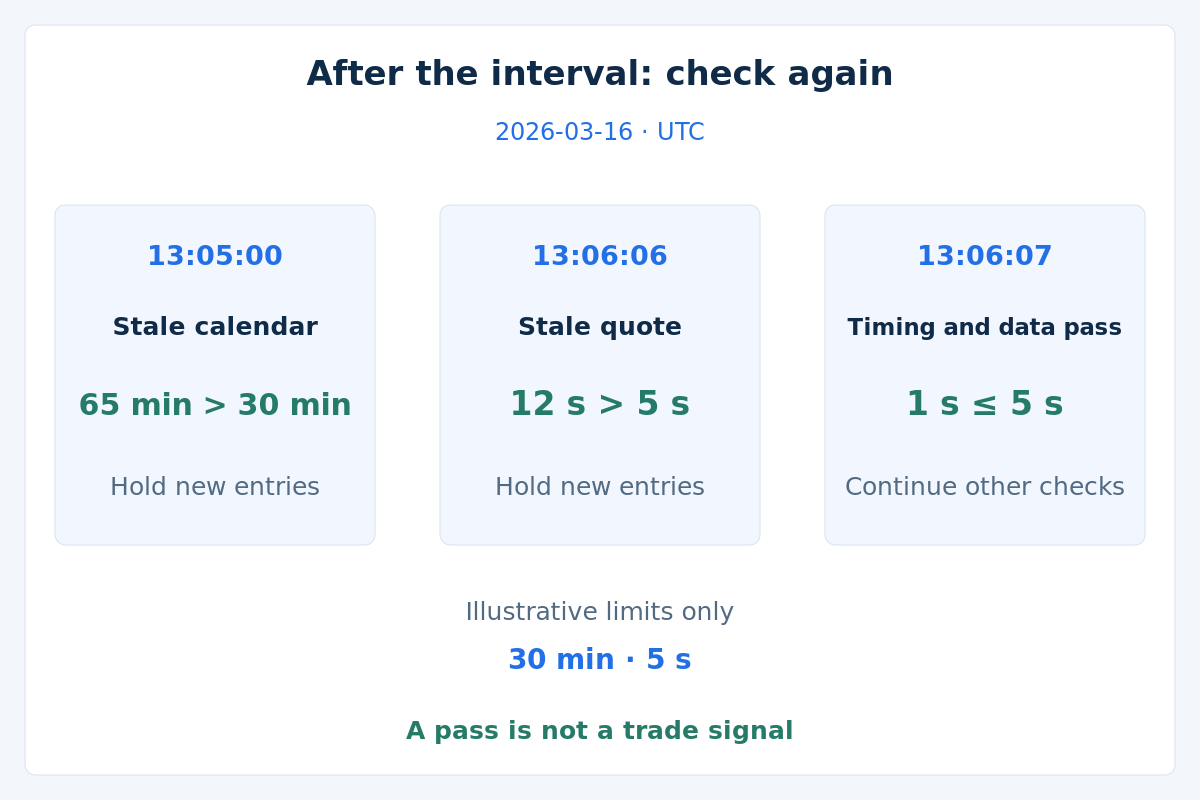
Choose a snapshot age of at most 30 minutes and an own-symbol quote age of at most 5 seconds for the arithmetic illustration. These are author-chosen inputs, not recommended refresh settings or safety guarantees. The first snapshot was verified at 12:00:00; a complete current replacement is verified at 13:06:00. At 17:00:00 another valid snapshot is available. Ages assume verified comparable time measurements.
| Decision · UTC | Snapshot age | Own-quote age | Timing/data result only |
|---|---|---|---|
12:10:00 | 10 min | 1 s | These checks pass; continue other checks |
12:20:00 | 20 min | 1 s | Block: active news interval |
13:05:00 | 65 min | 1 s | Hold: stale calendar |
13:06:06 | 6 s | 12 s | Hold: stale symbol quote |
13:06:07 | 7 s | 1 s | These checks pass; continue other checks |
17:00:00 | 0 s | 1 s | Block: outside session |
At 13:05:00, the news interval ends but the old snapshot is 65 minutes old. At 13:06:06, the new snapshot is 6 seconds old, but the symbol's last receipt at 13:05:54 is 12 seconds old. A receipt at 13:06:06 is only 1 second old at 13:06:07. That row passes the illustrated timing/data checks, not the strategy, execution or risk checks. The 17:00 boundary is excluded. No order, exit or return is simulated.
6. Preserve management and reconcile broker-held orders
Blocking new entries must not bypass the defined monitoring and management of existing positions. Management actions still need their own valid data and permissions; missing prices are not permission to modify a stop blindly. Specify separately how pending orders are held or cancelled, and verify accepted broker state rather than assuming a cancellation request succeeded.
MT4's AutoTrading button prohibits automated trade requests while the EA and OnTick() can keep running. It is therefore not a dedicated new-entry pause: management that needs trade requests can also be affected. Distinguish that button from unloading an EA or disconnecting the terminal. Existing broker protection and client-side management are different mechanisms; see risk management.
7. Keep retrieval from blocking the decision path
Use a complete validated cache for decisions and a controlled process for refreshing it. Define timeouts, failure reporting and how a new version becomes active. Calling management once before a slow request does not keep it running while that request blocks the same EA.
Optional: MT4 network and event limits
MQL4 WebRequest() is synchronous. Moving it from OnTick() to OnTimer() in the same EA does not make it asynchronous; a waiting request can still delay that program. A separate retrieval component can supply a validated snapshot, but its handover and failures must also be verified. A timer is a scheduling tool, not a guarantee of uninterrupted management.
The logical sequence is: run the defined management/monitoring path, evaluate the required new-entry checks, and only after a pass consider a current setup with execution and risk controls. This describes decision responsibilities, not runnable MQL4 code or a guarantee of timely processing. Test the actual integration, permissions and failure behaviour before relying on it.
8. Keep a decision record that survives a restart
Log the UTC decision time, server time and verified mapping, rule version, snapshot identifier and source/receipt times, coverage, symbol quote receipt/age, active exclusions and outcome reasons. Preserve rejected candidates as well as passed checks. A record should explain a hold without reconstructing it later from a revised calendar.
After restart or reconnect, reconcile existing positions, pending orders and unresolved requests with the broker. Restore only state that can be verified; a restart does not mean the account is flat or the cache is current. Prevent repeated processing of the same candidate. When necessary state is unknown, hold new entries until reconciliation; continue the defined fault response and management.
9. Test correctness before interpreting a backtest
Build small fixed cases with expected outcomes before testing market performance. Include:
- Session start included, end excluded, and intervals spanning midnight.
- News starts/ends, overlapping events and a delayed or changed schedule.
- Missing, partial, malformed or out-of-coverage calendar data, including an empty response that has not been verified.
- Freshness exactly at the chosen limit and just beyond it, plus a fresh tick on another symbol while the traded symbol remains stale.
- Restart, clock jump, failed refresh and interrupted snapshot replacement without resetting freshness.
- Broker-held orders and management paths while entry is blocked, including cancellation rejection and unavailable trade permissions.
MT4's Strategy Tester does not execute WebRequest() and does not handle Timer events. Test the shared decision logic with frozen data and a verified historical time mapping, driving it through a supported test path. Replay each snapshot only when it would have been available. A historical event table alone does not reproduce live retrieval or timer scheduling. Use the MT4 backtesting guide for broader limitations.
10. Validate benefit separately from correct operation
A correctly implemented filter can exclude winning trades as well as losing ones. Compare the proposed rule with a declared baseline using the same strategy, data and cost assumptions. Keep all candidates and rejection reasons, separate later validation data, and include realistic execution costs. Searching many time windows and reporting only the winner can overfit the sample.
Then forward-observe the actual integration on demo under normal and failed-data conditions. Measure refresh failures, stale-data holds, quote gaps, management delays and broker order responses. A clean log shows what the system did; it does not establish future profitability. Before broader use, confirm:
- The versioned specification, time mapping and event-selection policy are documented.
- Required coverage and data-age checks distinguish clear, blocked and unknown states.
- Boundary and failure cases match their expected outcomes.
- Historical tests preserve information availability and disclose missing history.
- Demo checks verify retrieval, restarts, management continuity and broker order state.
- Any claimed benefit is evaluated separately, with costs and later data rather than an invented performance figure.
11. Questions about EA filters
Does a clear calendar mean the EA should enter?
No. A verified clear calendar only passes one part of the decision. Session, quote quality, execution, account risk and a current strategy setup still matter. Unexpected news can arrive outside the schedule.
Why can a fresh download still leave the filter unknown?
The response may be old, incomplete, outside the required coverage or incorrectly parsed. Receipt time alone does not validate provider data. Keep the required-input hold until the relevant checks pass.
Can I test live news downloads in the MT4 tester?
The documented tester does not execute WebRequest or Timer events. Use frozen, versioned inputs and a supported path for testing the common decision logic, then verify actual retrieval and scheduling separately on demo.
Should I use AutoTrading as the news pause?
It is not limited to new entries: automated requests used by management can also be prohibited. An internal entry gate with separately verified management responsibilities is the design discussed here, not a universal switch for removing exposure.
12. References and scope
The official MQL4 WebRequest reference explains synchronous requests and their restrictions. The MT4 Strategy Tester limitations document time simulation and unsupported external functions and events. Verify the functions available in your exact platform and integration rather than assuming an example for another platform is compatible. References checked on 2026-10-17.
This guide completes the session/news guide cluster with a rule and validation framework. Its schedules, snapshots, ages and outcomes are invented teaching cases. The thresholds are not recommendations; no EA execution or trading result is claimed. Filters cannot eliminate market, execution or account risk.