

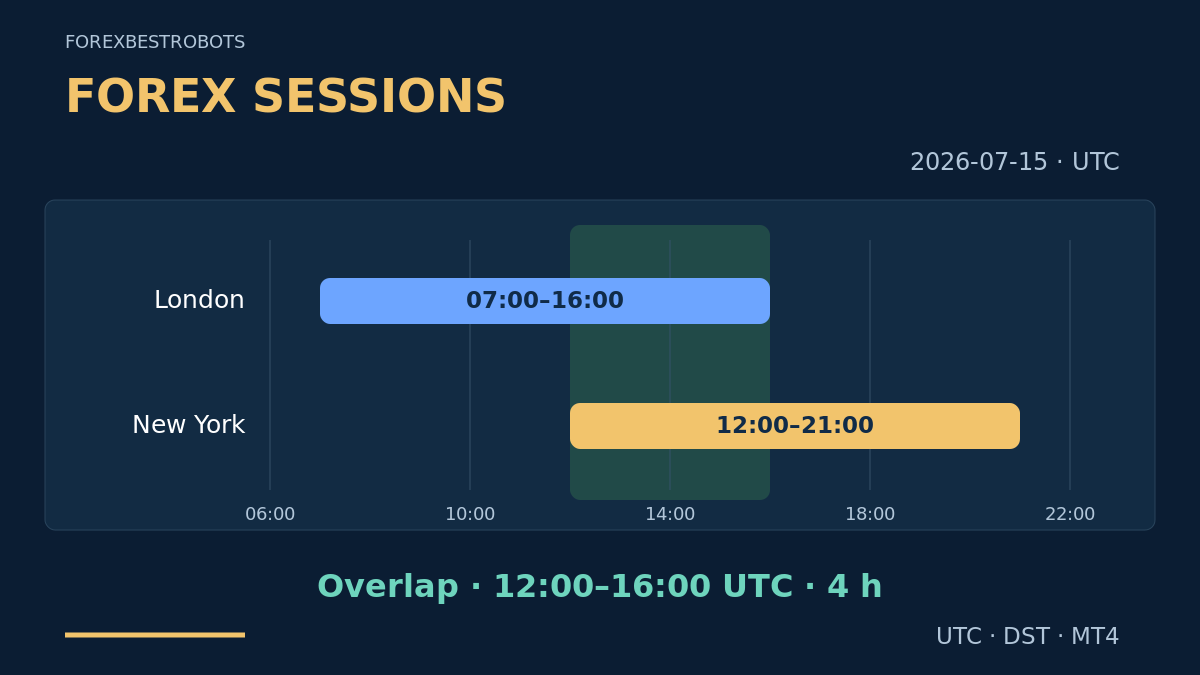
A session timetable helps answer a practical question: which part of the trading day am I actually observing? It does not tell you whether the next candle will rise or fall. Before comparing a London breakout with an Asian range, make sure that both labels refer to the intended dates and clocks.
Start with the simple rule: name the city, name the date, convert to UTC, then map that instant to your broker. This guide explains that process and the execution checks around it. The displayed windows and quote sets are teaching examples, not recommended trading settings or measured session performance.
1. What a Forex session actually means
Retail spot Forex is an over-the-counter market, not one exchange with a single opening bell. Sydney, Tokyo, London and New York are useful labels for periods associated with different financial centres. Timetables may choose different boundaries; agree on a definition before comparing them.
Separate three things: a broad session label, a broker's actual symbol trading hours, and your own strategy's permitted entry window. A broker may quote outside your chosen window or pause trading inside it. Check the relevant instrument and account; a Forex timetable is not a schedule for every CFD or futures contract.
2. Name the clock before naming the hour
“Trade from 08:00” is incomplete. It could mean London local time, New York local time, UTC, your computer clock or the broker server clock. UTC is a common reference that does not itself move forward for daylight saving time. A location's offset from UTC can change with the date.
Use date-aware zone names such as Europe/London and America/New_York. “New York time” follows both EST and EDT; a fixed “EST” offset does not. Keep the full date when a conversion crosses midnight. Do not assume the language of your trading platform identifies its time zone.
3. Compare four clearly defined working windows
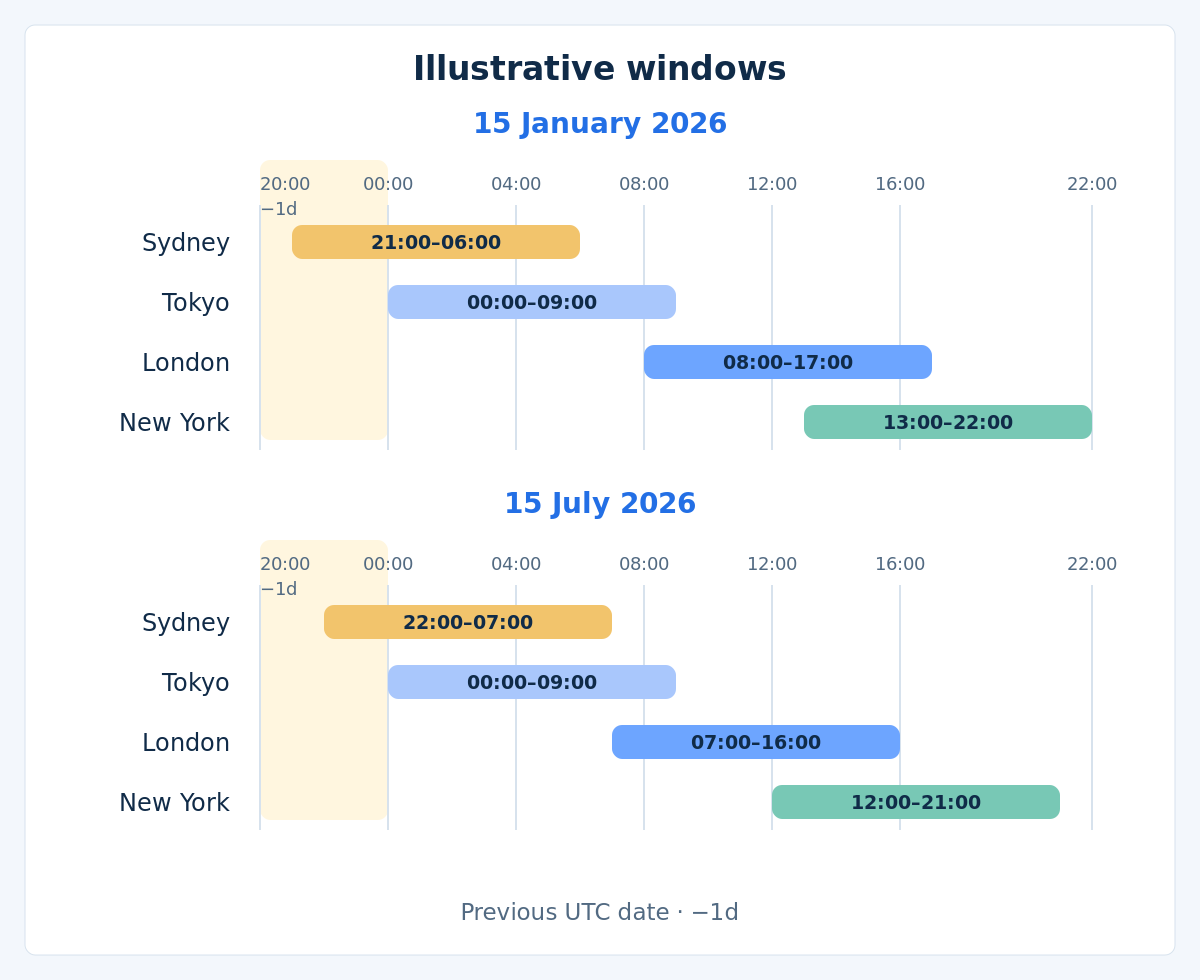
For this guide only, define Sydney, London and New York as 08:00–17:00 local time, and Tokyo as 09:00–18:00. Other session conventions exist. The UTC columns below convert those chosen local windows for the stated local dates; they are not live market-status indicators.
| Centre | Chosen local window and zone | UTC · 2026-01-15 | UTC · 2026-07-15 |
|---|---|---|---|
| Sydney | 08:00–17:00Australia/Sydney | 21:00 (−1d)–06:00 | 22:00 (−1d)–07:00 |
| Tokyo | 09:00–18:00Asia/Tokyo | 00:00–09:00 | 00:00–09:00 |
| London | 08:00–17:00Europe/London | 08:00–17:00 | 07:00–16:00 |
| New York | 08:00–17:00America/New_York | 13:00–22:00 | 12:00–21:00 |
−1d means the preceding UTC calendar date. Sydney's 08:00 on 15 January is 21:00 UTC on 14 January; the window then ends at 06:00 UTC on 15 January. Its July window starts at 22:00 UTC on 14 July. Tokyo stays at UTC+9 in these examples; Sydney's seasonal pattern follows the southern hemisphere.
Treat the table as a map, not a ranking. A currency pair, a holiday and a broker's available quotes can change the experience inside the same labelled window. Verify the symbol's actual weekly hours and maintenance breaks separately.
4. Allow for the weeks when DST dates differ
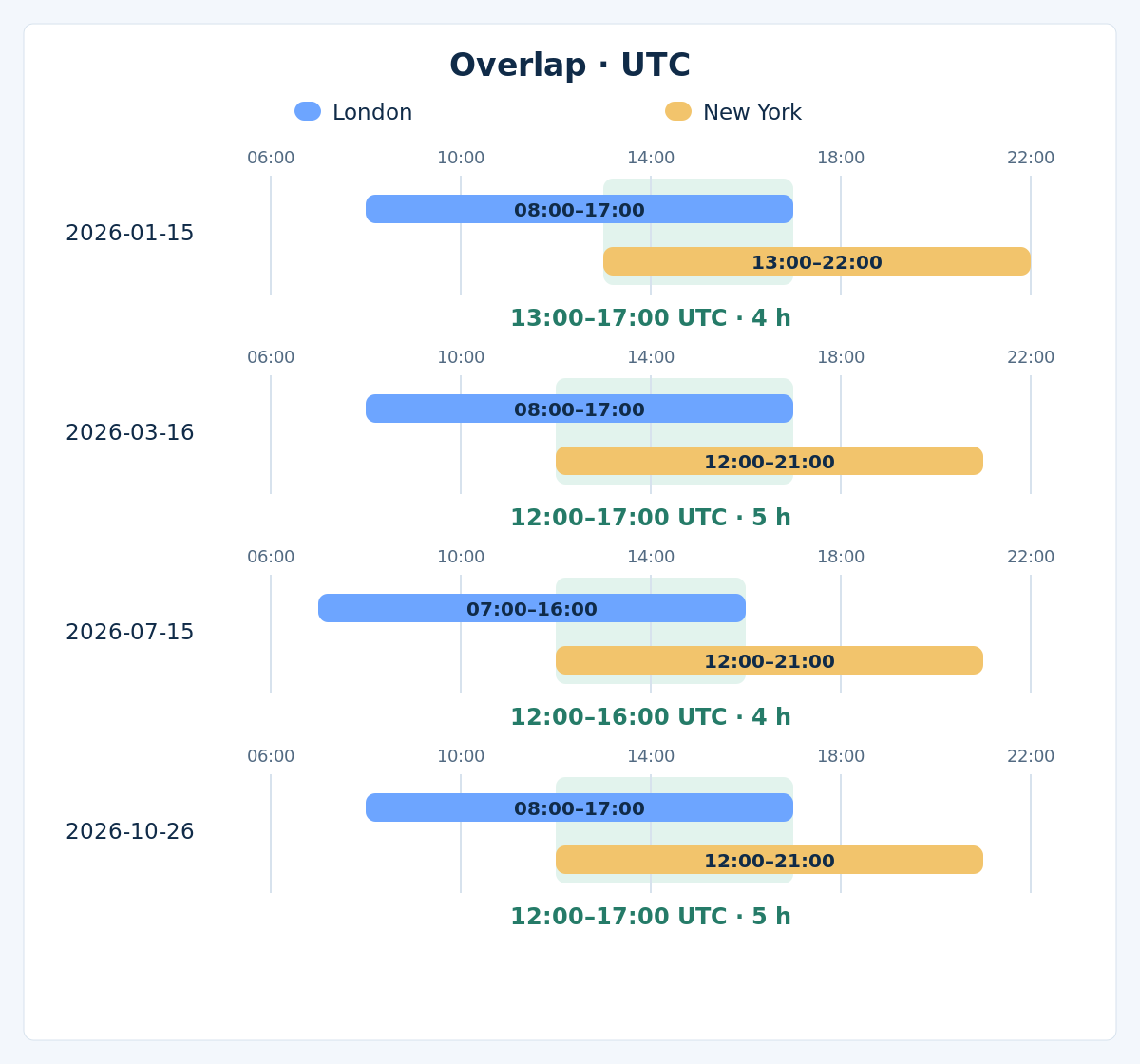
In 2026, New York changes clocks on 8 March and 1 November; London on 29 March and 25 October. The changes do not happen together. Under our chosen windows, their overlap therefore changes temporarily even though each local start remains 08:00.
| Date | London · UTC | New York · UTC | Overlap · UTC and duration |
|---|---|---|---|
2026-01-15 | 08:00–17:00 | 13:00–22:00 | 13:00–17:00 · 4 h |
2026-03-16 | 08:00–17:00 | 12:00–21:00 | 12:00–17:00 · 5 h |
2026-07-15 | 07:00–16:00 | 12:00–21:00 | 12:00–16:00 · 4 h |
2026-10-26 | 08:00–17:00 | 12:00–21:00 | 12:00–17:00 · 5 h |
For example, on 16 March the intersection starts at the later opening, 12:00 UTC, and ends at the earlier closing, 17:00 UTC: five hours. On 15 July the earlier closing is 16:00 UTC, leaving four hours. Reusing July's UTC timetable in the March transition period moves the window incorrectly.
Recalculate the date-specific intersection rather than hard-coding “the overlap is always four hours.” Overlap means the chosen time windows coincide. It does not guarantee tight spreads, strong volume, a breakout or a profitable trade.
5. Follow one instant through three clocks
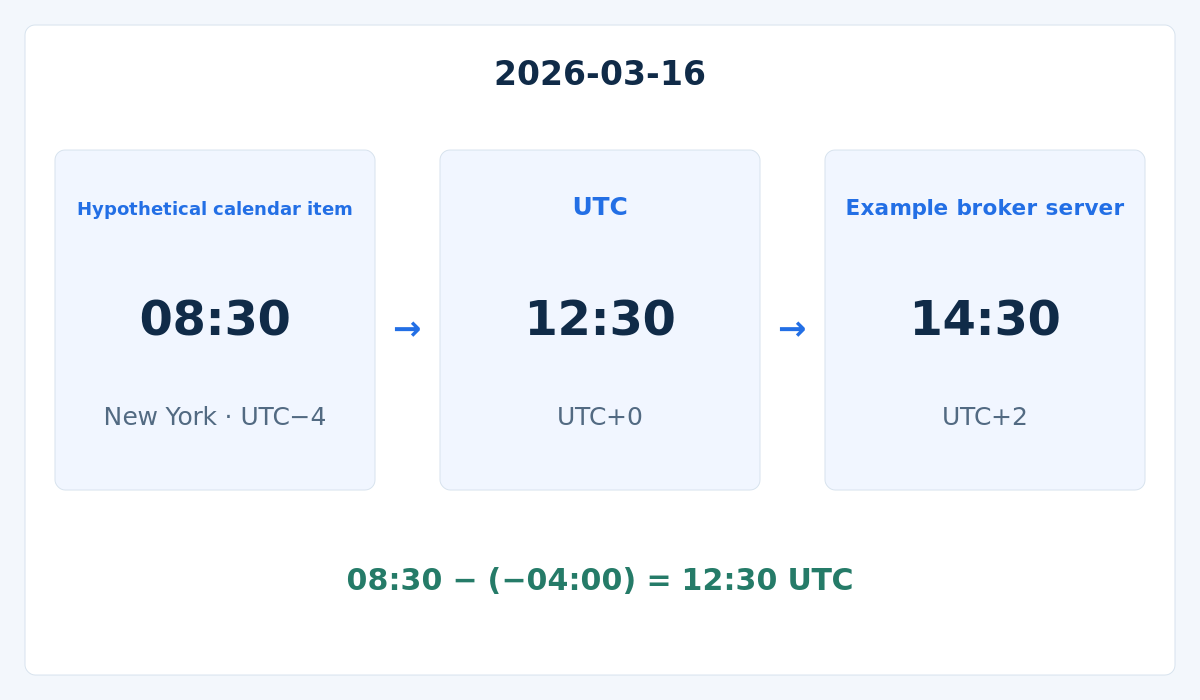
Imagine a calendar item scheduled for 08:30 America/New_York on 2026-03-16. This is an invented scheduling example, not a claim that a particular announcement occurred. New York is UTC−4 on that date, so the item maps to 12:30 UTC. London is still UTC+0, so London also reads 12:30.
Now assume a broker server uses UTC+2 on that date: it reads 14:30 for the same instant. The conversion is local time minus its signed UTC offset, then plus the broker's dated offset. Our assumed UTC+2 broker is an example; your broker can use another offset or change it on a different schedule.
Check the date again: an 08:30 New York item on 2 March maps to 13:30 UTC, whereas on 30 March it maps to 12:30 UTC and 13:30 London time. Copying a calendar's displayed hour into an EA input without checking both clocks can shift the intended restriction by an hour.
6. Check what the MT4 time function actually reads
MT4 chart bars normally carry broker server timestamps. Changing your computer's display clock does not redefine those timestamps. Write down which clock each EA input expects and how the broker's server offset is established for each date. If that mapping is unknown, do not enable new entries that depend on it.
A time window needs explicit boundaries. In a simple [08:00, 17:00) local window, 08:00 is included and 17:00 is excluded. A window crossing midnight also needs a rule for the trading-day label. Restricting new entries must not silently disable monitoring or the defined management of positions already open.
Optional: MT4 functions and historical time mapping
In MQL4, TimeCurrent() is the last known server quote time. In OnTick() it belongs to the handled tick; in other handlers it can reflect the most recent quote among Market Watch symbols. It is not a continuously advancing, independent clock, nor proof that the intended symbol's quote is fresh. The EA monitoring guide explains that distinction.
Live TimeGMT() is calculated using the computer's local time settings. In the MT4 Strategy Tester it equals the simulated TimeCurrent(); subtracting the two there does not reconstruct historical broker offsets. Tests need an explicit, checked mapping for the historical server dates. Current offsets are not a substitute for historical rules; see the MT4 backtesting guide.
7. Measure the quote instead of trusting the session label
Liquidity is the ability to transact at available prices and sizes; volatility describes price movement. They are related concepts, not interchangeable measurements. Record actual spreads, quote freshness and execution on the broker you intend to use. A quiet-looking chart can coexist with poor execution, and fast price movement can coexist with either narrow or wide spreads.
| Invented quote set | Bid | Ask | Spread |
|---|---|---|---|
| A | 1.10000 | 1.10010 | 1 pip |
| B | 1.10000 | 1.10040 | 4 pips |
For these invented EURUSD quotes, one pip is 0.00010. Set A has a 1-pip spread; set B has 4 pips. The Bid is identical, but the Ask entry for a buy is 3 pips higher in B. This is a cost comparison, not a simulated trade. Commission and adverse execution can add further costs; see Forex trading costs and slippage and latency.
A terminal's tick count is activity in its own feed, not consolidated global Forex turnover. A spread snapshot is also not a promise about the next fill. Compare distributions across comparable days and conditions rather than declaring one session “safe” from a single observation.
8. Put news, holidays and rollover beside the clock
A planned session can contain a major economic release or a central-bank announcement. Check events relevant to both currencies and confirm the calendar's display zone, date and latest schedule. Unexpected news can arrive outside any planned exclusion. A session filter by itself is not a news filter.
Holidays, weekend reopening, the weekly close and a broker's daily rollover or maintenance can change available quotes, spreads and financing. Confirm the broker's actual times instead of assuming every daily event occurs at 17:00 New York. A scheduled hour does not guarantee a fresh quote or execution at a stop price.
Specify separately what happens to pending orders and existing positions before a restricted period, and how management continues afterwards. Disabling an EA or disconnecting the terminal is not a substitute for those rules. Money at risk and combined positions still matter; use the risk-management guide when setting account limits.
9. A short checklist before enabling a window
- Identify the symbol, broker, account and actual trading hours.
- Write the local window, zone, full date and boundary convention.
- Convert to UTC, then to the broker's date-specific server time; check midnight and DST transitions.
- Confirm news schedules, holidays, rollover and maintenance restrictions.
- Check fresh Bid/Ask quotes, costs, order permissions and account exposure.
- Define pending-order handling, position management and the response to missing time data. If a required check fails, skip new entries.
10. Keep a record that can be tested again
Log the UTC instant, server timestamp and verified offset, local zone, session label, calendar restrictions, Bid/Ask and the decision taken. Preserve both accepted and skipped candidates, with reasons. Do not assign a favourable session label afterwards using the result of a trade.
Freeze the proposed time rule before testing it. Include clock-change periods, holidays and differing market conditions, with realistic costs and separate later data. Test nearby window choices as a sensitivity check; searching hundreds of start times and keeping only the winner invites overfitting. More trading activity does not establish a trading edge.
A beginner can first verify a small set of dated conversions and observe a demo feed without placing orders. Check the clock mapping before interpreting a session backtest. There is no universal “best Forex session”: suitability depends on the method, pair, costs, news exposure and the ability to monitor the rules.
11. Questions about Forex sessions
Which session is best for a beginner?
There is no universal answer. Start with a period you can observe consistently, confirm the broker's costs and news schedule, and practise the clock conversion on demo. A busy session can still produce abrupt movements and poor fills; its name is not a signal to enter.
Why does the London–New York overlap change?
Their local clocks switch on different dates. During the transition weeks, the difference between the two cities changes. Calculate both windows for the exact date and take their intersection; the four-hour and five-hour examples here use explicitly chosen local boundaries.
Will changing my computer clock fix an EA's session filter?
Not necessarily. Broker timestamps do not change with your computer's display zone. The result depends on which time function and inputs the EA uses. Verify that design and the dated server offset; do not change a system clock blindly to compensate.
Should an EA stop managing trades outside its entry window?
An entry filter only defines when new positions may be considered unless the system explicitly says otherwise. Existing-position management, pending orders and any timed exit need separate rules. Turning off management can remove protection that the method relies on.
12. References and scope
For date-aware time-zone rules, consult the IANA Time Zone Database. The official MQL4 date and time reference documents the platform functions. Clock examples were checked on 17 October 2026 against the relevant regional rules; recheck them for future dates and software updates.
This guide explains time mapping and execution checks. Its chosen session windows and invented quote sets do not establish a trading advantage. A time filter cannot remove market, execution or account risk.