

An entry rule is incomplete until it explains how an instruction becomes a position. A Buy Stop above the market and a Buy Limit below it express different conditions, even when the intended direction is the same. This guide follows an order from the decision through acceptance, triggering and execution, using fictional EURUSD quotes rather than a selected winning trade.
1. Start with two prices and two separate actions
Bid is the price at which you can sell; Ask is the price at which you can buy. A market BUY opens at Ask and closes by selling at Bid. A market SELL opens at Bid and closes by buying at Ask. Actual execution remains subject to the broker’s execution arrangements and available prices.
An ordinary MT4 Forex chart normally displays Bid candles. A line touched on that chart does not, by itself, establish that an Ask-based condition was or was not reached. Enable the Ask line for the current spread, but do not treat that current line as historical Ask candles.
Read the supporting guide on trading costs and executable prices.
2. Market orders: an immediate request, not a reserved quote
A market order requests execution now. The displayed quote is not a promise that the server will fill the request at exactly that number. Request time, server response, filled price and rejection are separate records. Execution mode affects the handling of price changes and requotes.
Suppose EURUSD is Bid 1.1000 and Ask 1.1002. An illustrative BUY filled at 1.1002 and immediately closed at an unchanged Bid of 1.1000 loses 2 pips before commission. Spread is already present in those two executable prices; adding it again to that price difference double-counts it.
3. Choose the instruction from the trading condition
Ask first whether the trade is intended now, after a pullback, or only after movement through a level. A market BUY suits an immediate decision; a Buy Limit expresses willingness to buy lower; a Buy Stop expresses willingness to buy only after an upward threshold. These instructions can produce different trades from the same analysis. A limit may miss a move entirely, while a stop may enter a failed breakout. Neither instruction improves the underlying signal by itself.
For a downward continuation hypothesis, a Sell Stop below Bid expresses the required sequence. A Sell Limit above Bid instead waits for an upward retracement before opening a short. If price falls without that retracement, an unfilled Sell Limit is consistent with the instruction. Replacing it retrospectively with a market sale would test a different rule. State expiry and the response to a missed entry before inspecting the outcome.
4. The four pending orders: compare the correct side
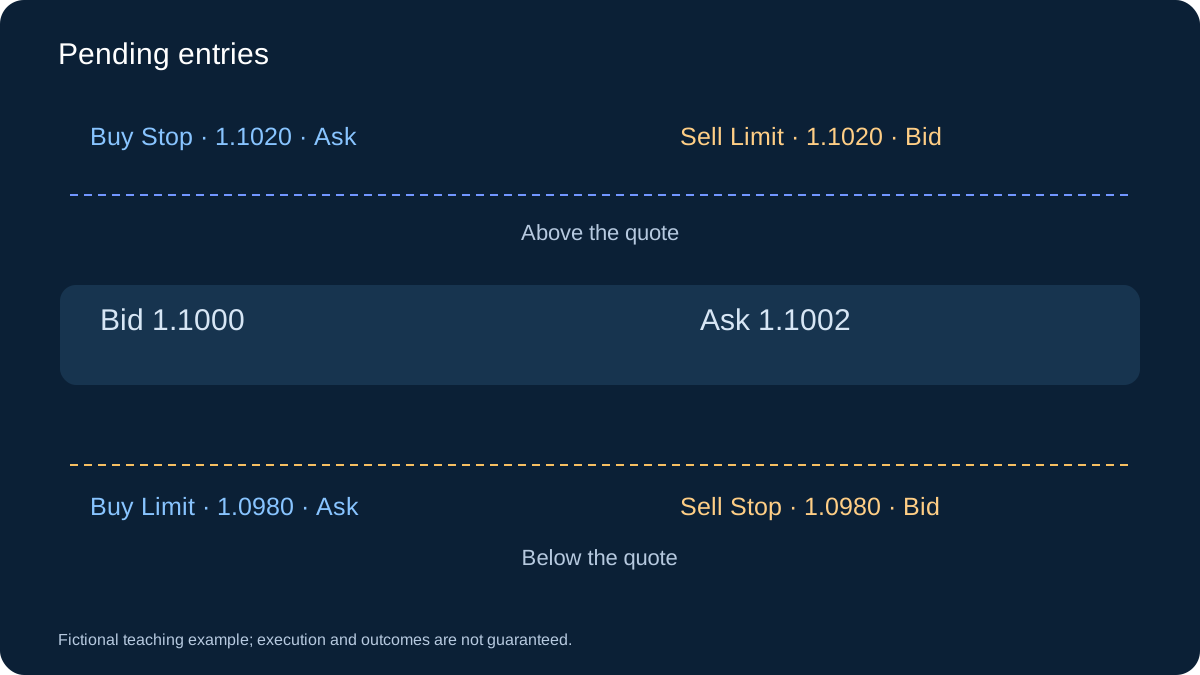
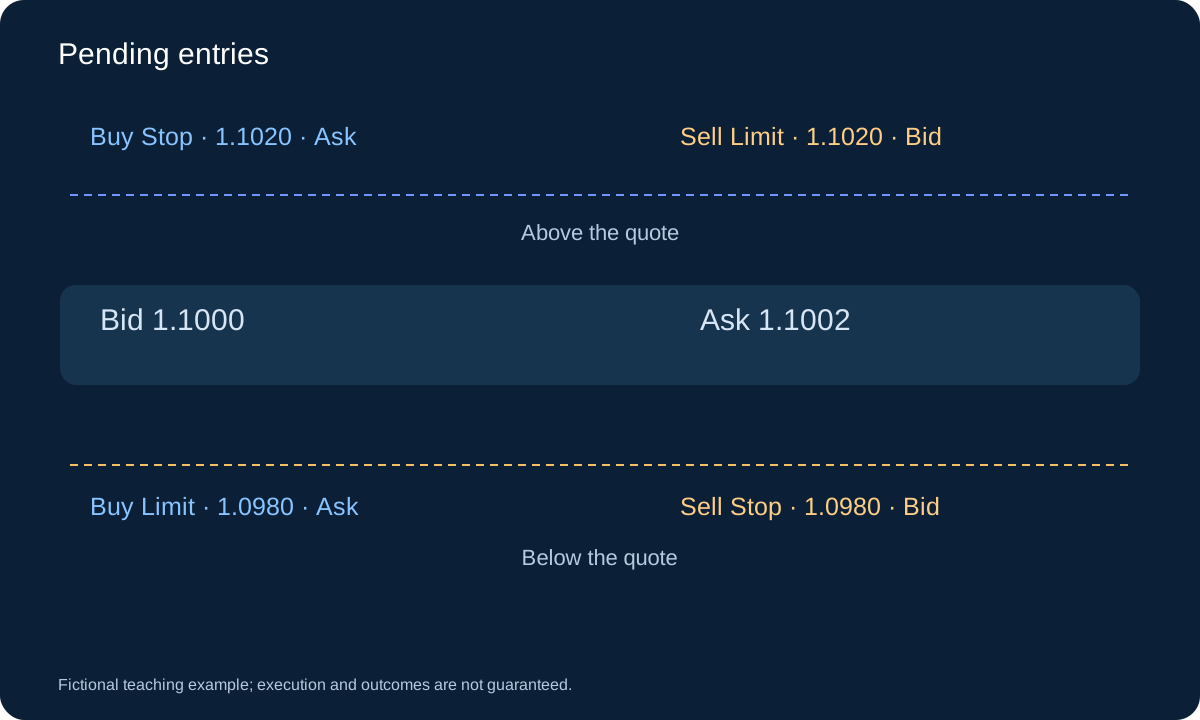
Buy Limit is placed below current Ask and triggers when Ask falls to its level; Buy Stop is above Ask and triggers when Ask rises to it. Sell Limit is above current Bid and triggers when Bid rises to it; Sell Stop is below Bid and triggers when Bid falls to it. Broker distance restrictions also apply.
With the same initial quote, 1.0980 illustrates a Buy Limit or Sell Stop, while 1.1020 illustrates a Buy Stop or Sell Limit. The order name also specifies direction. A Sell Limit at 1.1020 is an instruction to open a short position, not an instruction to take profit on an existing BUY.
5. Read the six entry instructions together
| Instruction | Condition at placement | Trigger or entry side |
|---|---|---|
| Market BUY | Immediate purchase | Ask |
| Market SELL | Immediate sale | Bid |
| Buy Limit | Below current Ask | Ask |
| Buy Stop | Above current Ask | Ask |
| Sell Limit | Above current Bid | Bid |
| Sell Stop | Below current Bid | Bid |
6. A trigger is not a guaranteed fill
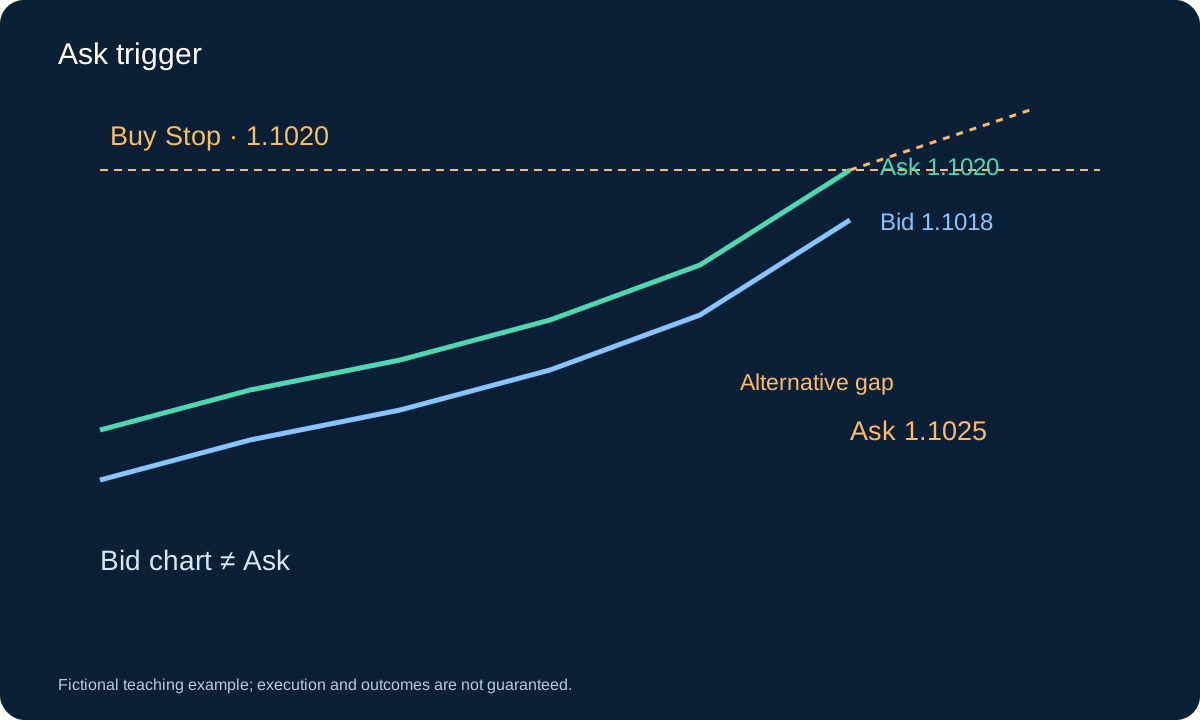
Consider a Buy Stop at 1.1020. An Ask of 1.1020 can reach its trigger while Bid is only 1.1018, so the Bid chart may still appear below the line. A sudden jump to Ask 1.1025 illustrates why the requested level and resulting fill can differ.
Do not transfer an exchange order’s guarantees to every retail Forex contract. Read the broker’s terms for pending-order execution, gaps, price improvement and slippage. A limit instruction normally restricts the acceptable entry price under those terms; a mere touch in an OHLC backtest does not prove an executable historical fill.
7. Stop Loss and Take Profit manage an existing position
A pending entry creates a position if executed. Stop Loss and Take Profit are attached exit instructions. For a BUY, exit conditions are checked against Bid; for a SELL, against Ask. Under the usual arrangement, a BUY has its initial stop below entry and target above it; a SELL reverses those directions.
Accepted server-side pending orders and attached stops can remain active when the terminal is closed. A locally simulated trigger, EA-managed exit or trailing calculation may require a running, connected terminal. Confirm which mechanism is actually used; a drawn chart object is not evidence that the server has accepted protection.
8. Follow a SELL from entry to exit
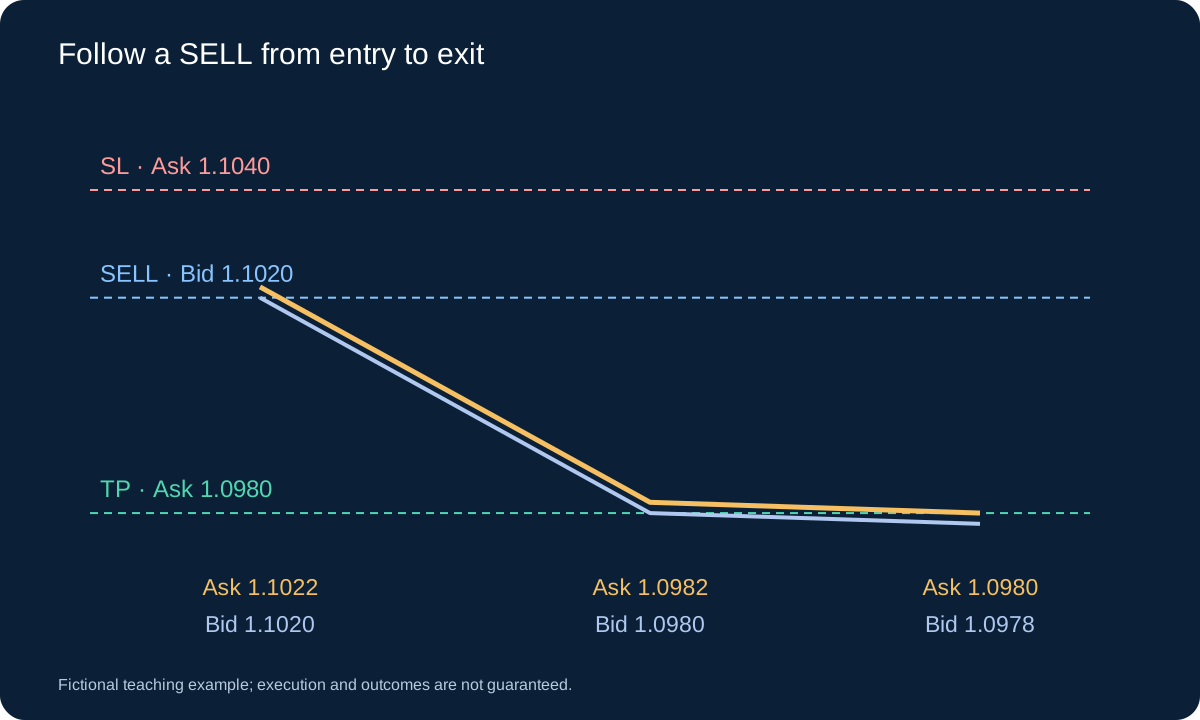
Suppose a Sell Limit at 1.1020 is accepted while Bid/Ask is 1.1000/1.1002. Later Bid 1.1020 and Ask 1.1022 reach its Bid-based entry condition. Assume an exact SELL fill at 1.1020, stop 1.1040 and target 1.0980. The stop is 20 pips above entry and the target 40 pips below. They are both Ask-based exits. The initial Ask 1.1022 already represents a 2-pip adverse round trip if the position were closed immediately.
If Bid later falls to 1.0980 while Ask is 1.0982, the target has not yet been reached by Ask. With an unchanged 2-pip spread, Ask 1.0980 would correspond to Bid 1.0978. Conversely, Ask can reach the SELL stop even when the visible Bid high stays below 1.1040. These are quote-side examples, not promises of exact fills. The order history, not a chart label, determines the actual entry and exit.
9. Check distance, precision, volume and expiry
Before sending, check the symbol’s digits, executable tick size, minimum and stepped lot size, trading session and permissions. A pip, a point and a tick are different concepts. In this five-decimal EURUSD example, one pip is 0.0001, one point is 0.00001 and 2 pips are 20 points.
StopLevel limits permitted distances and FreezeLevel can restrict modification or cancellation near the market. A reported zero StopLevel can still accompany dynamic server restrictions. Some servers reject order expiry. Record server time explicitly; do not silently substitute local time or turn a rejected expiry into an unlimited order.
10. Treat order handling as a state machine
Use the sequence: prepared request → accepted pending order → triggered and filled position → closed position. Rejected, expired and cancelled are separate branches. Deleting an accepted pending order before execution prevents that instruction from opening a trade; closing a position requires a closing trade. Cancellation can race with execution.
For an EA, retain the ticket, symbol, Magic Number, requested volume, acknowledged status and actual fill. After a timeout, inspect server records before retrying: an uncertain response does not prove failure. An unchecked retry can duplicate exposure. Reconcile the open position after every ambiguous response.
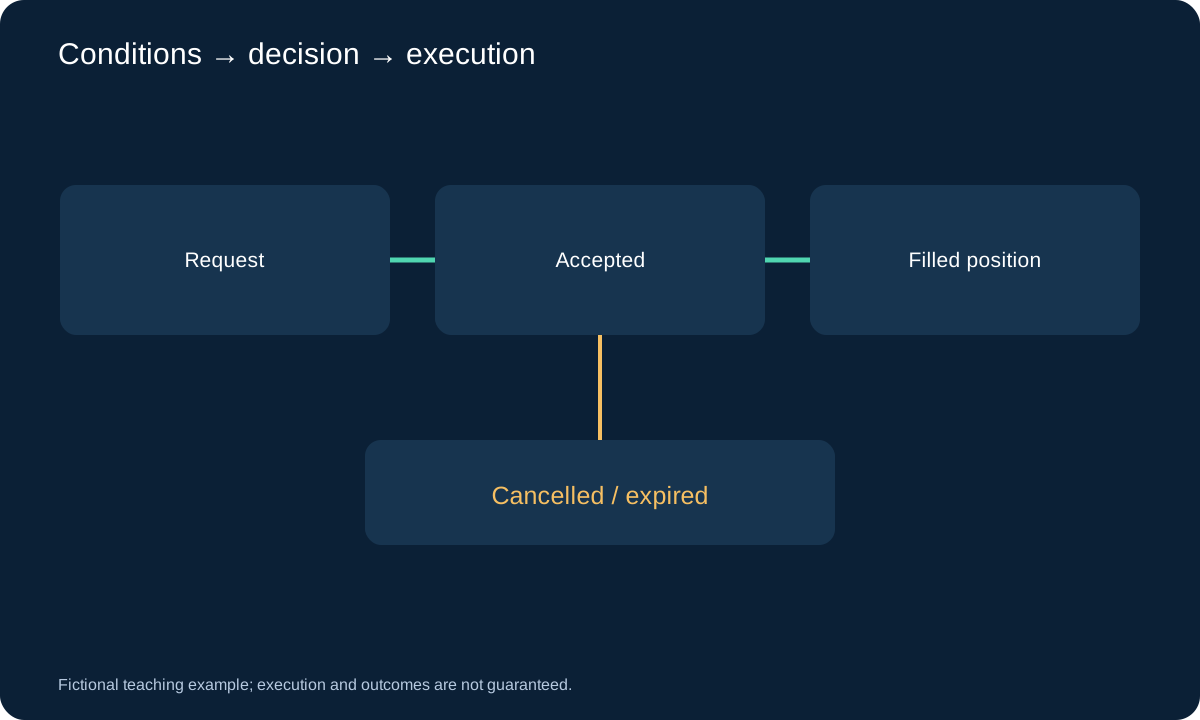
11. Practise a complete order lifecycle on demo
In MT4, open New Order, select the exact symbol and inspect its specification before choosing volume. For a pending entry, select Pending Order and then the required subtype. Enter the price, attached stop and target, and expiry if supported. Check the values together before submission; changing the subtype can change which side of the market is valid.
After submission, locate the accepted pending order in the Trade tab and inspect its ticket and protection. If the request is rejected, preserve the reason and correct the stated condition rather than silently switching to a market order. On activation, reconcile the actual open price and volume; after closing, reconcile Account History and charges. Demo execution is useful for learning the workflow, but it does not establish live fill quality.
Two opposite pending orders are not automatically an OCO pair in standard MT4. If an EA is intended to cancel the opposite order after one fills, both can still activate before the cancellation is acknowledged. Test that race, disconnect recovery and duplicate responses. An expired trading idea also needs a successful cancellation; removing a horizontal drawing or stopping the EA does not delete an accepted server order.
12. Audit the instruction before judging the strategy
Write down the price side, trigger level, expiry, maximum accepted entry deviation, stop, quantity and response to rejection. Separate the spread filter at submission from conditions at later activation. A pending order left on the server does not automatically inherit a new EA filter unless the EA successfully cancels or changes it.
Validate with time-stamped quotes and account records. A single candle may cross entry, stop and target without revealing their intrabar order. Use appropriate tick data or a documented conservative ambiguity rule, and count rejected, cancelled and missed instructions alongside fills. Faster entry and a higher fill rate do not establish profitability.
Questions
Is a Buy Stop the same as a Stop Loss?
No. A Buy Stop is a pending entry to buy above current Ask. Stop Loss is an exit instruction attached to a position. An exit from a short position also buys, but its purpose and order relationship are different.
Why did an order activate before the chart touched it?
An Ask-based trigger may be reached while the Bid chart remains below it. Check historical spread, the actual order type, server timestamps and execution records. A current Ask line cannot reconstruct the full past Ask path.
Can I close MT4 after placing a pending order?
A server-accepted pending order normally remains active. Local cancellation logic, synthetic orders and trailing adjustments need their own running environment. Confirm acceptance and the broker’s terms before relying on any instruction.
Sources and scope
The MetaQuotes references define platform order mechanics and restrictions. The prices, workflow examples and audit checklist are our educational constructions. Broker contracts determine the execution terms; this guide does not establish a trading edge.
- MetaQuotes · Order Types
- MetaQuotes · MQL4: OrderSend
- MetaQuotes · Requirements and Limitations in Making Trades
Fictional teaching example; execution and outcomes are not guaranteed.